The Bible App Named in Apple’s Best of 2012

For the third year in a row, the Bible App™ has been ranked in the top 100 Free apps for iPhone on Apple’s “Best of” list. The Bible App was in the top 100 for iPad too — which means that it has appeared in the top 100 iPad apps every year since the iPad was introduced!

Of course, the real story behind the Bible App’s success and recognition is you, the global YouVersion community.

It’s because you download the Bible App onto your devices and help your friends download it onto theirs. It’s because so many of you use the Bible App every day to engage with God’s Word. It’s because you never stop sharing how the Bible is shaping your life on Facebook, on Twitter, and face to face. And it’s because so many of you generously donate your gifts and talents as volunteers to help YouVersion constantly improve.

YOU are the “Best of 2012.” Thank you. And congratulations!

Share this post:

Watch the World Read About the Birth of Jesus

The story of our Savior’s birth has been told and retold for thousands of years, but this year, for the first time, you’ll be able to see how many people are actually reading it.

The Christmas Story Tracker is a fun live map we created to watch the world read about the birth of Jesus. When someone uses the Bible App to read a verse about the Christmas story, the map lights a star on their country. A counter at the top right shows the total number of readings from the YouVersion community since December 1.

Christmas Tracker


Whether you’re reading a Christmas Bible Plan or just a verse about Jesus’ birth, you’ll light up a star on the map and add to the running tally. And it’s easy to get your friends in on the fun: look for the Facebook and Twitter icons.

What are you waiting for…go check out christmas.youversion.com!

Share this post:

Do You Have Plans for Advent? Yes!

Advent is here! Every year, beginning four Sundays before Christmas, Christians all over the world prepare their hearts to celebrate the gift of Immanuel, “God with us.” YouVersion offers several Bible plans to help you reflect on Jesus’ birth. This year, we have more plans for you than ever before. Find the plan that’s just right for you—or try several!

Rediscovering the Christmas Season features reflection questions and action steps that help you focus on Christ every day between December 1 and Christmas. From LifeChurch.tv. 25 days

Countdown to Christmas is an Advent calendar that teaches your whole family the significance of Christmas through fun activities. From Thriving Family. 29 days

She Reads Truth: Advent brings scripture, short devotions, and a few questions together each day to create changed hearts this Christmas season. From She Reads Truth. 28 days

The Christmas Story starts with Old Testament prophecies about the coming Savior, then turns to the Gospel accounts of his glorious arrival. From YouVersion. 5 days

Christmas Begins with Christ focuses on Jesus, sharing the light, joy, peace, and hope surrounding his birth. From Tearfund. 28 days

Carols: A Christmas Devotional shares the biblical foundations of songs that celebrate the true joy of the season. From LifeChurch.tv. 25 days

Find even more plans in the Christmas and Advent category on YouVersion!

Share the Love of Jesus this Season

The holidays offer us chance after chance to share our faith with friends, family, and others. And the Bible App makes it so easy! This season, look for those ideal opportunities where you can share your faith, simply by showing them your Bible App:

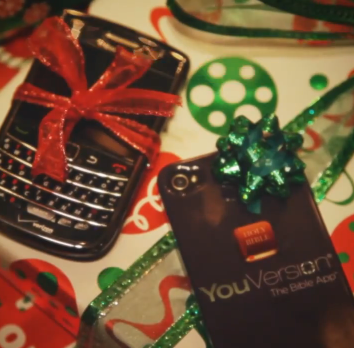
  • When someone receives a new mobile device as a gift
  • As you attend Christmas services
  • When you read the Christmas story with your family

Best of all, it’s quick and easy to help others get their own Bible App—no matter what kind of mobile device they have. Tell them they can just go to www.bible.com/download or, even better, install it for them!


Share this post:

Celebrate National Day of the Bible with Us!

Today, November 19, is National Day of the Bible, kicking off the annual celebration of National Bible Week. This week, Christians all across the U.S. will commemorate God’s Word with concerts, public readings, and special contests. (And if you’re lucky enough to be in Chicago this week, 2012’s official “Bible city,” be sure to check out their list of events.)

A group of businessmen started National Bible Week in 1940 to offer hope to a nation on the brink of war. In fact, when the first scheduled Bible reading radio broadcast was interrupted by news of the attack on Pearl Harbor, the broadcasters decided to continue reading Scripture in between news updates. And National Bible Week has continued as an annual tradition ever since, encouraging everyone to read the Bible, whether it’s Christians bolstering their faith or simply others who want to understand a different worldview.

Of course, the Bible App from YouVersion makes it easy. Our mission is to make the Bible freely available to as many people as possible, in whatever language they prefer. YouVersion offers more than 400 versions of the Bible in 209 languages (so far), along with hundreds of Bible reading and audio plans, also in many languages. With the Bible App already installed on almost 70 million unique devices, readers have spent more than 35 billion minutes reading God’s Word. You can get your very own Bible App on almost any mobile device quickly and easily—and always 100% free!

Share this post:

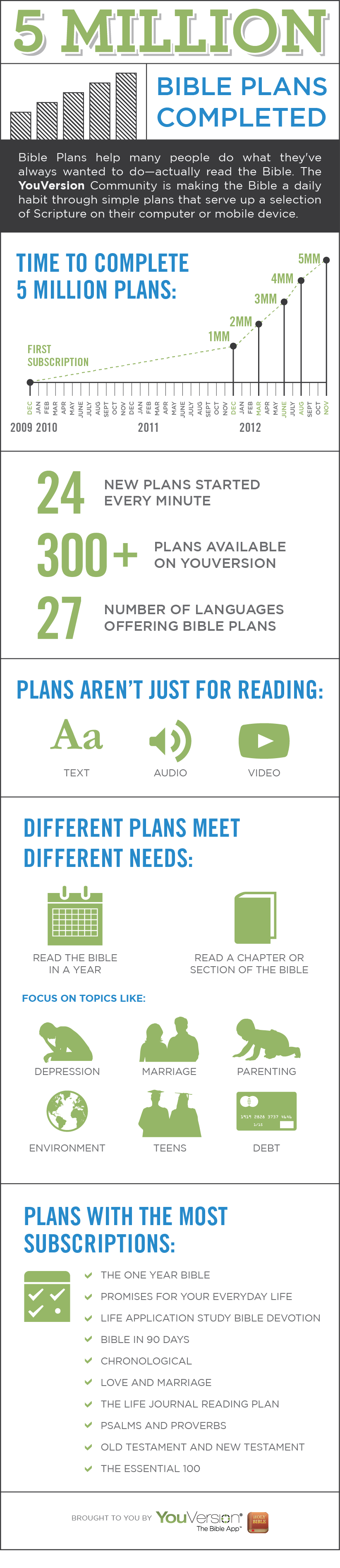
5 Million Bible Plans Completed!

YouVersion first launched Reading Plans in 2009, and since then people have used the Bible App to complete 5 million Plans! Whether you like to read, listen, or watch your daily selection, Bible Plans make it easier than ever to spend meaningful time in God’s Word. Thank you for being a part of what God is doing all over the world through the Bible App!

Making Plans Work for You

People who complete their Bible Plans sometimes get a little help along the way from these handy features. Just go to your plan’s Settings (the gear icon) and look for these useful tools:

  • Catch Me Up. Falling behind? In your plan’s Settings, tap Catch Me Up to shift your start and end dates. Your last fully completed day becomes yesterday. If you have partially completed days, those unfinished selections will remain unchecked.
  • Reminders. Have the Bible App remind you when it’s time to read. In your plan’s Settings, set Reminder to On and specify the time of day you’d like to be reminded. At the time you set, the Bible App pops up a handy reminder.
  • Email Delivery. Get your daily selections delivered to your inbox. In your plan’s Settings, set Email Delivery to On and select the time of day you’d like to receive your daily selection, along with which Bible version you’d like. The Bible App sends it to the email address you specified for your free YouVersion account.

For even more tips and tricks, be sure to check out YouVersion’s Support website!

Share this post: