Great News for Polish Speakers and Readers: All of YouVersion Now in Polish!

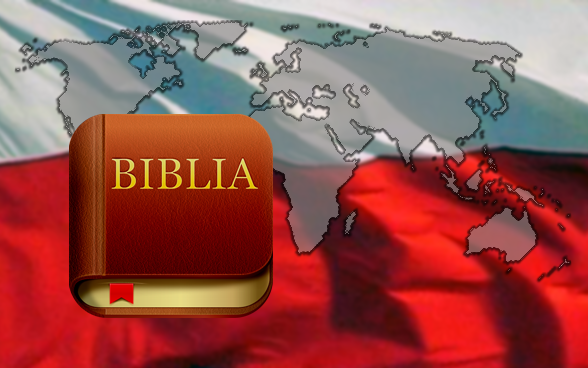
App Biblia z YouVersion już dostępna w polskichPolish is the thirteenth language launch across the entire YouVersion experience, brought to the YouVersion community once again by passionate volunteers. Besides English, all of YouVersion.com and the Bible App’s interfaces and tools are also available in Norwegian, Spanish, Simplified Chinese, Traditional Chinese, Russian, Korean, Brazilian Portuguese, German, Dutch, French, and Swedish. Here’s what Polish speakers and readers can enjoy in their language:

Polish Interface. Set your device’s default language to Polish, and the Bible App’s menus, buttons, and controls will display in Polish. (Newer releases on some platforms will even let you select Polish directly in your Bible App Settings.)

Polish Emails and Blog Posts. At the top right of our English language blog, select Polski—or just go directly to the Polish version—to read blog posts in Polish. For updates and other YouVersion communication in Polish, sign up for a free YouVersion account and adjust your Settings to Polski.

Technical Support in Polish. Visit the Polish version of our Support site for help with the Bible App. And if you contact us in Polish, you can receive answers to your questions in Polish.

Bible translations in Polish. Check the Versions list inside the Bible App under Polski, or visit the Versions page at YouVersion.com. You’ll find the Słowo Życia (PSZ), an easy-reading contemporary translation, generously provided by Biblica. Or perhaps you’d prefer the Uwspółcześniona Biblia Gdańska (PUBG-POL) from the Gate of Hope Foundation, an updated, modern language version of the classic Biblia Gdańska (PBG).

The massive task of translating YouVersion’s tools into other languages only happens through the tireless efforts of a worldwide community of volunteers. We sincerely cannot thank them enough for all the ways they serve the rest of us. And if you can help with either Polish or translation into a variety of other languages, whether it’s technical support, responding to requests on Facebook and Twitter, or even helping translate interfaces, we could really use your help! We asked Team Leader Sebastian about his experience helping to translate the Bible App into Polish. Here’s what he had to say:

YouVersion język polski tłumacz Sebastian F.

“When I started using YouVersion, I was really glad to find such an advanced application designed to help people engage with God’s Word. I started using YouVersion in English, but after a little while it just struck me, that so many people in Poland wouldn’t be able to use it only because they don’t know English. I saw the need, and I decided to do something about it. Now I can suggest using YouVersion to all my Polish friends, not only to English-speaking ones. Thank you to every team member for giving generously of your time—despite different challenges and hardships—to help Polish people get closer to God’s Word and, in this way, closer to God.”
—Sebastian F., Warsaw, Poland

Welcome to YouVersion! We’re so excited to invite Polish speakers and readers into our global YouVersion community. And we’d love for you to start connecting with other YouVersion members on Facebook and Twitter. If you have friends whose preferred language is Polish, please be sure to share the good news with them!
Share this post:

Championship-Winning Coach Tony Dungy Brings Brand-New Devotional to the Bible App

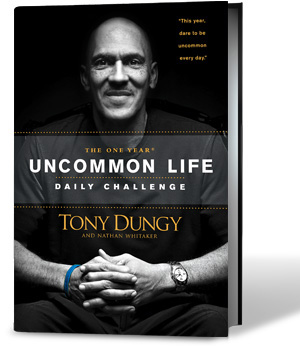
Tony Dungy’s One Year© Uncommon Life Daily Challenge and the Bible App™Just in time for the Big Game this weekend, we’re excited to bring a brand-new, 15-day devotional to the Bible App™ from an American football icon: The Uncommon Life Daily Challenge from Tony Dungy.

Take beloved Super Bowl-winning coach Tony Dungy’s challenge! Strengthen the core of your life and faith in seven key areas: Potential, Friends, Influence, Mission, Faith, Core, and Family. Designed to help you dig deeper into God’s Word and live your own uncommon life, each day features a brief devotional with a Scripture and a note from The One Year Uncommon Life Daily Challenge by Tony Dungy and Nathan Whitaker.

This new devotional is just one of more than 200 reading plans in 10 languages you can choose from. And with more than 200 Bible versions in 75 languages, YouVersion.com and the Bible App have something for everyone.

Special thanks go to Coach Dungy and to Tyndale House Publishers for generously providing content from The One Year Uncommon Life Daily Challenge.

Share this post:

YouVersion’s 21-Day Challenge: You Could Win an iPad 2 or a Kindle Fire!

YouVersion’s 21-Day ChallengeIf you’ve ever tried to establish a daily Bible reading habit, you know how hard it can be to make time to read in your busy schedule, especially when you’re just getting started. Many individuals in the YouVersion community have said that a reading plan helps them read more of the Bible, more often. YouVersion already offers more than 200 Reading Plans to help you find just the right fit for you. Beginning today and running throughout the next 21 days, we’re adding some extra incentive to help you: The 21-Day Challenge!

All you need to do to participate is keep at least one Reading Plan up to date for 21 days in a row. Everyone who completes 21 consecutive days of a Reading Plan will receive a special “21-Day Challenge” badgeon their YouVersion profile. Plus, we’ll also enter you into a drawing to win one of the following:

  • iPad 2
  • Kindle Fire
  • YouVersion T-shirt and sticker pack

Full details are below in the official rules. Join us, tell your friends… and keep reading!


Here’s how it works:

  • If you don’t already have a free YouVersion account, sign up for one.
  • Complete each scheduled day of a YouVersion Reading Plan, starting February 1 (today) through Tuesday, February 21.
  • Eligible plans are any Reading Plan started between January 1, 2012 and February 1, 2012 by 11:59 PM (the end of today). Calculated according to Central Time U.S. (GMT -6).
  • If you are subscribed to more than one Reading Plan, you only need to complete 21 consecutive days for one of them.
  • Ensure that the plan you want to read for the 21-Day Challenge continues through at least February 21. (You can check your plan’s calendar in its Settings, either in the Bible App™ or at YouVersion.com.)
  • Listening to audio versions counts.
  • Whether you read, listen, or sign up to receive your plan by email, be sure that every passage for each day’s reading is checked off as completed.
  • Don’t miss or skip any days!
  • 23 winners will be selected through random drawing from pool of eligible participants. Available prizes are as listed above: Apple iPad 2 (1), Amazon.com Kindle Fire (1) and YouVersion T-shirt/sticker pack (21).
Share this post:

YouVersion Community Shares Their Stories About “The Other 16”

In November, we reported that one in 17 Android devices and iOS devices (iPhones, iPads, and iPod touches) had installed the Bible App™. We also invited you to join in sharing the Bible App with The Other 16, those 16 out of 17 smart phone users who hadn’t already installed it. And your response overwhelmed us!

As we wrap up The Other 16 challenge, we want you to know what happened. At the end of November 2011, the Bible App had been installed on over 34 million unique devices. But since then—in just two monthsmore than 5 million people installed the Bible App for the first time. Thanks to you, the Bible App just passed 40 million installs.

As part of the challenge, we asked to hear stories about your Other 16. Here’s what just a few of you had to say:

“I reached The Other 16 simply by showing people how awesome the Bible App is on my phone. In just one night at our LifeGroup, 10 young adults downloaded it.”
—TJ Wolfe

“I got to explain to some of our church leaders how the Bible App had really made a difference in me finding time for meaningful Bible study. I showed them passages I had highlighted and bookmarked, and even screenshots of passages I wanted to memorize — which I use kind of like flash cards in my photo file. My pastor and our music minister installed it on their devices immediately!”
—Amanda G.

“Three of my friends saw me doing my daily devotion every day, and they got interested. I told them this was the best Bible app, and they downloaded it too. Now we’re doing a devotion together, and I must say it has really brought us closer, both as friends and in our relationships with Him.”
—Cailyn M.

“I love the YouVersion Bible App, and I’ve been sharing it ever since I found it. But when I saw your challenge, it was on. I challenged my family, and they met the challenge. My son shared at school. My husband shared at work. And I shared with my women’s group that first day. When I ran into my son’s principal, I started to tell her about the Bible App — and she said my son had already downloaded it for her! I love your Bible app!”
—Carmen L.

To all who shared your stories with the rest of us in the YouVersion community: Thank you! (And keep an eye on the mail for your YouVersion T-shirt!) But just because the “official” The Other 16 challenge is ending, that doesn’t mean we don’t want to keep hearing from you. Come tell us all about your Other 16 on Facebook and Twitter!


Share this post:

How to Make the Most of Your YouVersion Reading Plan

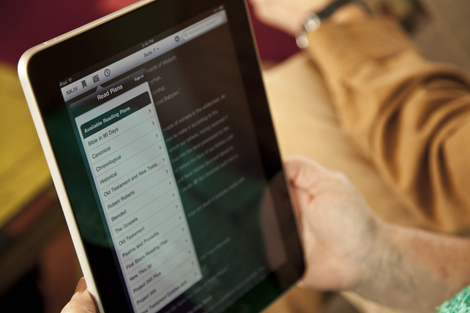
The Bible App™ on iPadWhen you start a YouVersion Reading Plan, you have the best intentions. You’re going to read every day and never miss, once and for all establishing that daily Bible reading habit that you’ve been promising yourself. And then your life happens—you get busy, you get tired, you get interrupted. Hearing what God has to say to us each day is important. So we’ve put together a few tips to help you find consistent success when you read God’s Word.

Find your version. YouVersion offers more than 200 Bible versions. If you have a favorite Bible verse, select “Bible” from the Bible App™ dashboard and look it up. Try reading it in several different versions, and see if one feels more natural to you than others. (To change versions, tap the “short code” next to the chapter name, then select another.) If you don’t have a favorite verse, try reading a well-known one like John 3:16 in different versions. You might even do a little research online to find a version that fits your reading style.

Pick your size. Set realistic goals. If you’ve never tried a Reading Plan before, a one-year reading plan probably isn’t the best place for you to start. We offer plans that can take you through a book of the Bible in as little as 2 days. Take some time to browse. You’ll find plans for 5 days, 7 days, 14 days, 90 days—and more. And if you’re using the Bible App for iOS (iPhone, iPad, or iPod touch), you can even go to Browse Plans, Advanced, and list plans by length.

Pick your power time of the day. Are you a morning person or a night person? Maybe you take a break in the middle of the day or in the early afternoon to think. Whatever your time, plan to check your Reading Plan then—during the time when you know you’ll probably get the most out of it. Most newer versions of the Bible App even let you set reminders. Try setting yours for your best time.

Find your spot. Do you have a favorite place to think? Maybe you have a quiet spot where you’re less likely to be interrupted. It could be inside or outside. Do you prefer to sit, stand, even walk around? Many people have told us they love listening to audio Bibles while they’re exercising, working, or during their commute. Find your best place to concentrate, and plan to spend your time in God’s Word there.

Talk to God. Right before you read, take just a moment to pray. It doesn’t have to be anything formal or elaborate. Ask God to give you ears to hear what He wants to say to you. Ask Him give you direction and insight through His Word. Ask Him to help you understand. James 1:5 says God generously gives us wisdom—if we’ll just ask. Get your heart and mind into a posture of listening for His still, small voice.

Read, or listen. If you’ve done everything else, this part should be easy. Adjust your Bible reader’s background color, font, and size until you find just the right comfortable mix. Or, if reading is difficult for you, don’t forget: we offer audio Bibles in several versions and languages. Try putting in headphones and just listening. You can even listen while you walk, run, or ride.

Reflect on what you just read. For most people, when they read God’s Word, specific things will jump out at them. Take notes. (Keeping track of your thoughts is easy with the Bible App’s Notes and Bookmarks.) Again, keep it simple for now. Replay those things over and over in your mind. (In the Bible, David calls this “meditating on the law of the Lord.”) In Jeremiah 29:13, God promises His people that they’ll find Him when they seek Him with all their hearts.

The Bible is more than just a book, more than the sum of its parts. In fact, the apostle Paul, who was mentoring Timothy, once wrote to him in a letter: “All Scripture is inspired by God and is useful to teach us what is true and to make us realize what is wrong in our lives. It corrects us when we are wrong and teaches us to do what is right. God uses it to prepare and equip his people to do every good work.” (2 Timothy 3:16–17)

Make the effort to delight yourself in His Word, and to think about what it says. When you spend purposeful, meaningful time reading what God has to say to you, you’ll discover insights that will transform your relationship with Him and shape your perspective on your daily life.


To learn more about the “how to” of Reading Plans:

  1. Visit our Support website.
  2. Bottom: Select your preferred language.
  3. Left: Choose your device type.
  4. Look under “Plans.”


Share this post: