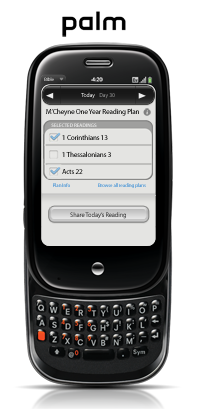
webOS Bible App v. 2.2.1: Reading Plans Update

palm webOS Reading Plan

Great news for our HP/Palm webOS users! The latest release of the Bible App™, v. 2.2.1, is ready for you now in the App Catalog. Besides the usual bug fixes and performance tweaks you’d expect, we’ve fully implemented Reading Plans—more than 50 of them! A Reading Plan is a simple, focused way you can read through whatever interests you in God’s Word. Reading just a little each day, you can cover the entire Bible, specific portions or topics, or daily devotionals. And if you get off track, just select “Catch Me Up,” and the Bible App will adjust your schedule based on what you’ve already completed.

After you’ve installed the Bible App, select Plans and browse for one that suits you. With a free account at YouVersion.com, you can link to your social networks and share your Reading Plan with your friends. You can even sign up to get progress update emails for yourself and an accountability partner.

Why not make 2011 the year you read your Bible every day? It’s never too late to get started. In fact, if you’re up for a challenge, one plan can even take you all the way through the Bible in just 90 days. Connect with us on Facebook and Twitter and let us know what you think!

Share this post:

2010 Mashable Awards: YouVersion a Finalist

Mashable 2010 Awards Ceremony: "YouVersion" on the screen

You may remember us asking you back in December to help us out by voting for us in the 2010 Mashable Awards. We just wanted to give you a quick update on the results. Last week, Mashable announced the winners at a special ceremony at the 2011 International Consumer Electronics Show (CES). We’d like to congratulate eBuddy, a messaging service who took home the prize for Best Mobile User Experience, the category in which YouVersion was nominated. While we did not win, we were proud to at least be named as a finalist. You can see the full list of winners at Mashable’s website.

We especially wanted to take a moment to say thanks to all of you who participated, for nominating us and especially to those who voted for us!

Share this post:

Who Has Time to Read?

The Bible App(TM) Icon

Why don’t people read the Bible more? Most Christians say it’s because they don’t have enough time. This week, we’ve been talking about how you can use a Reading Plan in the Bible App™ or at YouVersion.com to genuinely engage with the Scriptures. Most of us probably don’t feel there’s any “spare time” in our busy schedules. But there’s actually lots of time each day we could reclaim. Have you ever considered how much time you spend in a typical day…waiting?

When your Bible’s always with you, you can read:

  • Before anyone else you live with gets up (if you’re a morning person).
  • While you’re having your morning coffee or breakfast.
  • During your morning/evening commute on the train, the tube, or the bus. (Please: Not if you’re driving!)
  • While you’re waiting for a meeting to start.
  • As you’re eating lunch or taking a break from work.
  • When you’re waiting in line. (This could be anywhere: the grocery store, the post office, a movie.)
  • When you’re using the restroom. (Some of us get more time in the loo than others—some of us, much more time.)
  • While you’re hanging out waiting for your kids at soccer, at dance, at football practice, at volleyball, to get out of school… (If you have kids, you know this list could be practically endless.)
  • After everyone else you live with is asleep (if you’re a night person).

With the Bible App or another free tool, God’s Word is always as close as your phone. With offline versions like ESV and NLT (among many others), you don’t even have to be connected to the Internet or your service provider. If you don’t already have the Bible App, get it now. And start redeeming your time.

Share this post:

Share Your Reading Plan Experience

Share Your Reading Plan Experience

If you’re reading through the Bible this year—whether on your own or joining us in our challenge to read 1 billion minutes in the Bible App™ during January—have you considered sharing what you’re up to? Jesus said we’re salt and light. When you openly tell others what God is doing in your life, you never know what He’ll do in the lives of those who hear it.

We’re blessed to live in a time where our opportunities to communicate are unprecedented in human history. Just 20 short years ago, if someone told you you’d be reading this blog right now, you wouldn’t even have had a context to understand what they meant.

Here are just a few ways you can share with the Bible App:

  • Share on your social networks. Mention @YouVersion on Twitter and in Facebook status updates. “Like” YouVersion on Facebook, and share the Facebook app and our page in Facebook. You can share individual verses—even your Reading Plan! We’ve tried to make it easy.
  • Write Notes about what you’re reading. When you mark your Notes as public, you can share what God’s showing you in His Word with everyone using YouVersion.com and the Bible App. (They’re on YouVersion.com, iPad/iPhone, Android, and BlackBerry.)
  • Help your friends install the Bible App on their mobile devices. It’s free! It’s on iPhone, iPad, Android, BlackBerry, webOS, Java and Symbian.

And here are some other ways you can share:

  • Encourage your friends to read the Bible (whether in the Bible App or not).
  • Write about your Reading Plan on your blog. Consider not only covering what you’re reading, but challenging your readers and followers to join you.
  • Serve as a YouVersion volunteer in one of the many roles we could use help with: proofreading, user support, app testing, design, development, and more. Click here to sign up.

The ways you can share are limited only by your own imagination. Who are you praying for? Who do you know who needs to hear the message of God’s love? You don’t have to give them a hard sell. You don’t have to be a Bible scholar with a theology degree. All you need to know is what God has done in your life…and tell somebody.

Share this post:

How to: Ask Your Friends for Help Reading the Bible

Yesterday we talked about the value of telling the people in your life about your goals. Today we’ll talk about taking that even further.

Ecclesiastes 4:9–10 says, “Two are better off than one, because together they can work more effectively. If one of them falls down, the other can help him up. But if someone is alone and falls, it’s just too bad, because there is no one to help him.”
(Good News Translation)
Proverbs 27:17 says, “As iron sharpens iron, so a friend sharpens a friend.”
(New Living Translation)

We need our friends. YouVersion makes it easy to recruit your friends and family to help you. When you sign up for a Reading Plan, consider taking just a minute to set up progress update emails that can be sent to a friend. (You can send them to yourself, too!):

  1. Sign in at YouVersion.com.
  2. Select My > Reading Plans.
  3. Click the link or the [Plan Overview] button for the plan you want help with.
  4. Click the Accountability tab (lower right).
  5. Turn Accountability on (lower left).
  6. Add each friend you want to receive updates.
    Note: They’ll need a free YouVersion.com account, and they need to be following you.
  7. Check your box if you also want to receive updates.
  8. Click [Save].

That’s it! Of course, things happen. If you happen to miss a day, it’s easy to get back on track. Just pick back up where you left off. You can even go to your plan at YouVersion.com and click the “Catch Me Up!” link at the bottom of the page, or go to your plan on your mobile device, view the Plan Info page, and tap the [Catch Me Up] button.

We hope you have a great year diving in to God’s Word!

Share this post: