Steve Jobs, 1955-2011

In 1440, Johannes Gutenberg first shared his concept for the printing press. By the early 1450’s, he had put his ideas into action, printing the Bible faster and for far less money than the only option previously available: hand-copied versions that took years to create. Through a series of unfortunate events, Gutenberg lost his printing presses to a creditor a few years later. In 1468, he died, having never achieved financial success. Worse, there was no way he could have foreseen at the time how his amazing invention would go on to change the world. 

Today, of course, we recognize how this early Bible printing device ultimately gave birth to modern publishing. Gutenberg’s contribution was the spark that made possible the vast proliferation of knowledge and information that the rest of us have benefited from over the last 571 years.

In our generation, many inventors and technologies have dramatically shaped the landscape of our everyday lives, reaching into every corner of society and every industry. Arguably, the greatest innovator and creative genius of this generation has been Steve Jobs. His ideas, leadership, and life’s work influenced the direction of entire industries: broadcast media, motion pictures, music, publishing, communications, and of course, computing.

Jobs was actually able to achieve the financial success that eluded Gutenberg, leading Apple to become the highest-valued company in the world shortly before his passing. And although he was fortunate to actually get to witness the massive growth and adoption of his inventions, Steve Jobs was likely unaware of just how his creations would be used to further the vision of Johannes Gutenberg.

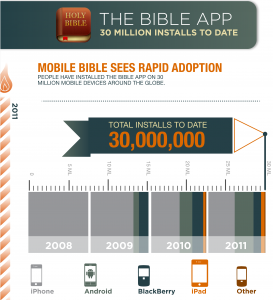
Using the Bible App on their iPhones, iPads, and iPod touches—to say nothing of the countless other devices influenced by Steve Jobs’ ideas—30 million people now have free access to the very book that Gutenberg started printing.

Many people now know the Bible as the Bible App, primarily because Jobs envisioned a new kind of communication device. Just as research was indicating a rapid decline in Bible reading and engagement, millions of people all over the world are now spending billions of minutes reading, listening to, and sharing the Bible—using mobile devices that Jobs either created or influenced.

Once again, history repeats itself. When Gutenberg set out to print the Bible, he unknowingly sparked a revolution that changed the world. Jobs turned publishing, media, entertainment, and communications upside down through his iNventions. And in so doing, he unknowingly sparked a revolution in Bible engagement that we believe will change the world.

Share this post:

Happy Birthday, YouVersion—We’re 4 Years Old!

Original YouVersion.com DashboardA Simple Idea. In June of 2007, the concept of YouVersion was first introduced to the world: A free, online Bible that would allow anyone with Internet access to link rich media (like video, audio, images, text, and more) to passages in the Bible. It would retain the sanctity of the Scriptures, but you’d also be able personalize your interaction and experience with them. Three months later, on September 27, the YouVersion.com Beta officially launched, marking the beginning of what has so far been an incredible four-year journey. Throughout that time, our goal has been helping people deeply connect with God’s Word.

YouVersion Goes Mobile. In April of 2008, we announced our first mobile version. While that event was significant, we couldn’t have predicted what was about to happen. A vibrant YouVersion community gathered suddenly around the mobile version, and together we discovered how transforming it was to have the Bible with us everywhere we went, all the time. We read the Bible more, referred to it more, and started sharing God’s wisdom with our friends more than ever before.

A Revolution Begins. Just three months later, in July, we announced the first version of the Bible App™ for iPhone with a simple video. In just 24 hours, early adopters spent almost 200,000 minutes using the Bible App on their iPhones, propelling it into the top 50 apps on iTunes. It was official: this was the beginning of a revolution in engaging with God’s Word.

And Now Here We Are. Today, with the Bible App installed on nearly 30 million unique devices, the YouVersion community is literally worldwide. Generous Bible publishing partners provide us with 152 translations in 45 languages. More than 190 Bible reading plans help us breathe in God’s Word every day, reading and listening. Things we could only imagine doing on mobile devices four years ago, the Bible App lets us do easily now: Bookmarking, Notes, sharing on social media sites, sharing through email or text messages… and more. And this is only the beginning. We’re committed to continuing to use the best of today’s and tomorrow’s technology to help the world fall in love with God’s Word.

When you use the Bible App to uncover God’s story of love, and when you share that journey of discovery with your friends, you’re a key part of that global YouVersion community. Thank you for all you’ve done!

Share this post:

The Bible App for BlackBerry: Now With Highlights, Better Bookmarking

You can now get version 3.5.1, the latest release of the Bible App™ for your BlackBerry device, in BlackBerry App World or as a direct browser download. In this exciting update, highlights are all new, and bookmarks are better than ever:

  • Highlights. For the first time on BlackBerry, now you can highlight individual or multiple Bible verses or passages in different colors—just like in your favorite paper Bible! (If you’re new to reading the Bible, highlights are a great way you can mark verses you enjoy, or that you want to easily spot again later.)
  • Bookmarks. Bookmarking on your BlackBerry device works pretty much the same way it has for a long time, where you simply tap on what you want to mark, then select Bookmark. Only now, for the first time ever, you can select multiple verses at a time! But you’ll find a lot more functionality than just that. For example, you can choose a highlight color, add a title to your bookmark—even label it. Bookmarks are great for sharing special passages with friends, better organizing your personal studies, or for whatever purposes your imagination and creativity lead you to.
  • Fixes.While this release also includes the standard “bug fixes” and “performance enhancements,” the most significant thing we addressed this time around was repairing a troubling issue that was causing freezes for some users under certain conditions. That shouldn’t happen anymore, and the Bible App should be noticeably faster at many common tasks.

The Bible App™ for BlackBerry Select The Bible App™ for BlackBerry Bookmark Properties The Bible App™ for BlackBerry Bookmark List
The Bible App™ for BlackBerry Edit Note The Bible App™ for BlackBerry Custom Color

Please help us get the word out. If you have friends with BlackBerry devices, a new release of the Bible App offers a great opportunity for you to share YouVersion with them. Please consider helping your friends who have never tried the Bible App get it installed and start their own free YouVersion account. Everything we do is always completely free. Our simple vision has always been to make it as easy as possible for people to engage freely with God’s Word, no matter where you live or what language you prefer. And remember: The YouVersion community on Facebook and Twitter loves hearing your stories about spreading the Bible App!

Share this post:

Brand New Features in the Bible App for Android Version 3.4: Available Now

Version 3.4, the latest release of the Bible App™ for Android, is available now in the Android App Market, for immediate download. You’ll find this updated version packed with great new features, all specifically designed to make your experience connecting with your YouVersion friends better than ever:

  • Easier, More Direct Help. Now you can access Technical Support from directly inside the Bible App. With just a couple of taps, you can email our Support team from wherever you are, a feature which will automatically include useful information that can help get your issue addressed much faster.
  • Sign up with Facebook. For the first time, now you can sign up for a free YouVersion account using your Facebook login, right inside the Bible App. This streamlines creating your account, which will save you time: You won’t need to verify your email address, and your YouVersion account will automatically connect to Facebook for you. It’s now faster and simpler than ever to share your favorite verses or Bible plans—or even the Bible App!—with your friends.
  • Create New Notes from Other Apps. Now when you connect your YouVersion account with other digital Bible platforms that use compatible technology (like Monvee), the notes you make on Bible passages in those other places can sync directly with your YouVersion account!
  • Highlights for Notes. Notes just got a whole lot richer. Adding to the Bible App’s already robust set of features for notes, now you can even label individual notes with highlight colors. This allows you to spot your notes at a glance, and even to coordinate or organize them by color if you want.
  • Faster than Ever. With every new release, we try to resolve known issues and improve performance. But in 3.4, we’ve specifically addressed speed by caching data on your notes and in YouVersion Live. What this means is that the Bible App makes smart decisions and loads things in the background, based on whatever you’re doing. This translates into much snappier performance for you.

The Bible App™ for Android 3.4 Help Launcher  The Bible App™ for Android 3.4 Help Launcher  The Bible App™ for Android 3.4 Sharing  The Bible App™ for Android 3.4 Highlights
Let your friends know! The YouVersion community is of course all about sharing your experiences connecting with God’s Word. A new Bible App update with great features like this one is a great way you can start a conversation with your friends who have Android devices. Please consider offering to help them install the Bible App on their mobiles, and even show them your favorite ways to use it. And tell us your stories! Our Facebook and Twitter communities love hearing creative ideas about how we can all share the Bible App.

Share this post:

More Powerful Search Comes to Bible App for iPhone and iPod touch

Find exactly what you’re looking for! The newest update of the Bible App™ for iPhone and iPod touch was just released. Version 3.5—available now in the iTunes App Store—offers inline translation notes, improved signup with Facebook, easier Help, faster performance, and enhanced Search features. Today we’ll share some quick tips to help you take full advantage of the most robust, flexible Search tools the Bible App has ever offered.

Note: For now, these enhanced search features are available only on iPhone and iPod touch.

Quick Search in the Bible App™ for iOS Version 3.5Quick Search. As always, search is available directly from the Dashboard Launcher, right at the top. Simply click in the “Reference or Keyword” text field, key what you’re looking for, then tap the [Search] button. You can search on individual words, whole phrases, and even jump to specific passages with book names, and/or chapter numbers, and/or verse numbers.
 
Advanced Search in the Bible App™ for iOS Version 3.5More Search Options. As soon as you tap Search, the Bible App presents you with several additional options:

  1. Sort Order. Choose Traditional (in book order) or Relevance.
  2. Advanced. Once you’re in Search mode, switch Advanced to ON to see more options for refining your search results:
  3. Version. Select the Bible translation you want to search.
  4. Section. Choose Old Testament, New Testament, or both.
  5. Book. Select the specific book(s) of the Bible where you want to search.
  6. Instant Results. Based on the options you’ve selected, your search results display—in context—at the bottom of the screen. Simply tap one to jump to it in the Bible Reader. Try a new search from the “Reference or Keyword” text field at the top, and your results update instantly.
  7. Search History. Tap the clock face button (top right) to display your previous searches. (More details below.)
 
Search History in the Bible App™ for iOS Version 3.5Search History. When you have a free YouVersion account, the Bible App saves all of your previous searches in this list.

  • Cancel. Tap the [Cancel] button to return to the Advanced Search screen.
  • Previous Search. Tap a previous search to once again see its results on the Advanced Search screen. (You can even refine those results with the Advanced features.)
  • Clear. Tap the [Clear] button to empty your Search History.
 

We hope these enhanced features will make it faster and easier than ever for you to find whatever you’re looking for in the Bible. Our passion is to help as many people as possible freely connect with the Bible, no matter where they live or what language they prefer. And great new tools like enhanced search can be a great conversation starter to help you share the Bible App with your friends.

Thank you so much for the part you play in the global YouVersion community!

Share this post: