
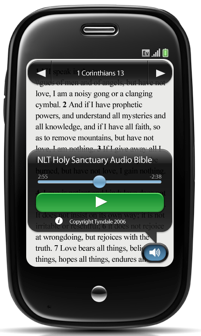
New from YouVersion: The Bible App for HP webOS Has Audio Bibles!

New from YouVersion: The Bible App for HP webOS Has Audio Bibles!Free audio Bibles are now immediately available in the Bible App™ for HP WebOS. You can even listen to audio Bibles right inside your Reading Plan! Visit the App Catalog to have the latest release, version 2.3.1, sent directly to your device. (Remember: You won’t be able to use the new audio features until you have this latest release.)

Once you’ve gotten the update, you’ll be able to listen to the Bible on your webOS device while you’re working, exercising, driving…or even reading along! Here are just a few examples of some of the audio Bibles you’ll find in this release:

  • New International Version (NIV)
  • English Standard Version (ESV)
  • New Living Translation (NLT)
  • King James Version (KJV) Listener’s Bible
  • Douay-Rheims (DRA) New Testament Audio Bible
  • Chinese Standard Bible (CSB)
  • American Standard Version (ASV) New Testament
  • La Biblia de las Américas (LBLA), and
  • World English Bible (WEB)

This release also fixes a minor bug that kept the version list from updating properly. You might even notice better performance, as the Bible App now runs many of its tasks in the background, to get you to your reading more quickly.

Our partners are constantly working with the YouVersion community to bring you as many options as possible—including more languages—so keep checking your list of available audio translations. Select the current version name to display the complete list; audio Bibles are indicated with a small gray speaker icon next to them. Then, when you choose a version that includes audio, use the basic play controls to listen, fast forward, and rewind. We’d love to connect with you on Facebook and Twitter and hear what you think!
Share this post:

The Bible App for Android Now Has Highlights, Better Bookmarks

We’re happy to share some exciting news today with the more than 5 million of you who connect with God’s Word using the Bible App™ for Android. Version 3.2 brings one of the most requested features: Highlights! Now, for the first time ever in the Bible App, you can select individual verses, or even entire passages, and highlight them with different colors. Use them just as you would with marker highlights in your paper Bible.

Highlighting a verse is simple. When you select a verse or multiple verses, tap the arrow icon in the bottom right corner and then choose a color. (Hint: You can even create your own custom color using the color wheel.)

But that’s not all—bookmarks are better too. Now you can give bookmarks a title and/or label to keep them better organized. Simply select a verse or passage, tap the arrow icon in the bottom right corner of the reader, and select “Bookmark” from the popup menu. Then give the bookmark a title, label, and you even have the option to highlight the verse while you’re creating the bookmark.

This newest release of the Bible App for Android is available now in the Android App Market. (And for those of us who are using iPhone/iPad or BlackBerry mobile devices, we can look forward to these features on our platform soon!) Don’t forget to comment and rate the app in the Android Market. It helps increase visibility so more people can find and engage with Scripture through the Bible App.

Share this post:

YouVersion Webcast Recap from May 26

Thanks to the thousands of you in our YouVersion community who tuned in for our live webcast today. We loved having the chance to connect with you and celebrate all you’ve been a part of over the past few months. So many of you joined us and did such an incredible job sharing the event and asking great questions that #YouVersion became a worldwide trending topic on Twitter! What a fantastic way to raise the visibility of God’s Word around the globe.

If you didn’t get a chance to catch the webcast while it was happening, we’ve posted the full video from the event below, along with a few highlights.

Key Links

A Quick Review

We recently announced that the Bible App had been installed on 20 million devices, and in the short time since that announcement, we’ve reached 22 million installs.

YouVersion currently offers the Bible in 41 languages and one of our main areas of focus this year is to rapidly increase that selection. Today, people can read the Bible or a portion of the Bible in about 2,000 languages, but there are more than 6,000 languages spoken throughout the world. Our goal is to make YouVersion available in every single language in existence.

More than 25% of the new installations of the Bible App occur on phones that are set to a language other than English, and Korean is the fastest growing language. By the end of the year, we hope to see 40-50% of new installations happening in languages other than English.

We announced a feature that many of us in the YouVersion community have been looking forward to—highlights! The feature is newly available on Android phones and will be coming to BlackBerry and iOS devices in the coming months.

The Bible App is here to help us all make God’s Word a part of our daily lives, but we also know how meaningful it is to share what we’re experiencing with others. To make this easier, we’ve set up a way for you to create your own meetups with other people who are passionate about the Bible. We’re also planning on adding social networks beyond Facebook and Twitter, and later this year we’ll be expanding the features offered for YouVersion Groups.

We’ve been aggressively working to upgrade the support we offer the YouVersion community. A new support site was just launched and we plan on including in-app access to support in coming releases.

Improved search functionality within the Bible App will be included on future updates to make it easier to find words and phrases in Scripture.

Many of you asked how you could say thank you to the Bible societies and publishers who make it possible for the YouVersion community to engage with so many great versions of Scripture for free. At the bottom of each version of the Bible you read in the Bible App, you’ll notice a link to more information about the organization who makes that version available. We encourage you to visit that link, contact them to say thank you, or support them financially. They are truly the heroes in making these versions freely available to all of us.

Thanks again for being a part of what God is doing through YouVersion. All of this truly could not happen without you. We believe that we could see half a billion or even one billion people engaging with Scripture through the Bible App as, together, we continue to take steps toward becoming the most Bible-engaged generation in history.

Share this post:

The Bible App for iPad: Now with Audio Bibles, YouVersion Live, and More

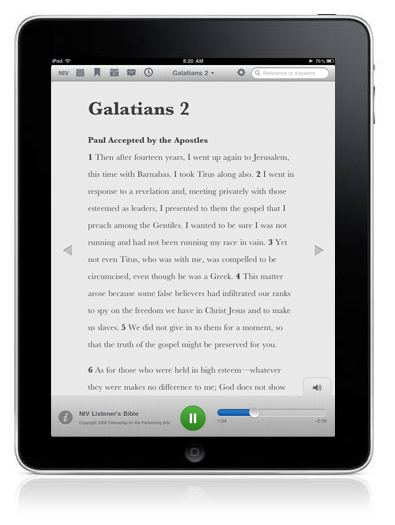
Although version 3.1 of the Bible App™ for iPad has lots to offer, many people will probably be most excited about audio Bibles, now available on iPad for the first time! Of course, before you can take advantage of these new audio features, you’ll first need to get the update, available immediately from the iTunes App Store.

The Bible App for iPad: Now with Audio Bibles, YouVersion Live, and MoreWith this update, we’re exploring some new ways to interact with the audio Bible component while reading Scripture. When you select a Bible to read that has audio, you’ll see a new small tab in the bottom right corner of the screen. Tap that tab to reveal the audio Bible player like the screenshot below. From there, you can play, pause, and move forward and backward within the chapter.

To see which translations support audio on your iPad, just look for the speaker icon [The Bible App for iPad: Now with Audio Bibles, YouVersion Live, and More] next to the list of versions inside the app. Here are just a few examples you’ll find:

  • New International Version (NIV)
  • English Standard Version (ESV)
  • New Living Translation (NLT)
  • King James Version (KJV) Listener’s Bible
  • Douay-Rheims (DRA) New Testament Audio Bible
  • Chinese Standard Bible (CSB)
  • American Standard Version (ASV) New Testament
  • La Biblia de las Américas (LBLA), and
  • World English Bible (WEB)

Be sure to keep checking your Versions list, because we’ll be adding even more audio Bibles (and in more languages) in the coming months.

More for iPad. Also in this release, iPad adds full access to YouVersion Live Events for the first time, just like you’ve already been enjoying on iPhone. Lastly, one awesome new feature exclusive to iPad is that, as you begin typing Bible book names in Search, the Bible App will auto complete them for you—a huge time-saver!

iPhone, iPad, and iPod touch. There’s so much to love in this release. No matter which portable Apple device you use to engage with the Bible, you should notice that chapters you’ve visited recently will load faster. And thanks once again to YouVersion’s awesome community of volunteers, if your device’s default language is set to Italian, you’ll discover that the Bible App’s interface is now much more intuitive for you.

Here’s how you can get yours right now:

If you already have the Bible App installed:

  1. On your Apple device, tap the App Store icon.
  2. When the App Store opens, tap the Updates icon.
  3. Tap Update for the Bible App
    OR
    Tap Update All.

If this is your first time installing the Bible App:

  1. On your Apple device, tap the App Store icon.
  2. When the App Store opens, tap the Search icon.
  3. Search for “Bible”.
  4. Tap the Bible App from LifeChurch.tv.
  5. Tap the FREE button.
Share this post:

Reminder: Webcast TOMORROW, May 26!

Be sure to mark your calendar and join us for a very special webcast, as together we celebrate all that God has done through YouVersion and what’s to come in the near future:

TOMORROW, MAY 26, at 11:00 AM CDT

We’ll be sharing the latest news and taking an inside look at what’s ahead for the Bible App. Don’t forget to let your friends know about it on Facebook and Twitter. When you do, you’ll be entered to win an iPad 2! Use the following phrase to be eligible:

Join me for the @YouVersion Webcast Thurs, May 26, 11am CT. RT to enter to win an iPad2!

We’re excited about this opportunity to come together as the YouVersion community and we can’t wait to hear from you. Get your questions ready, because we’ll be awarding a couple of iPad 2s to people who ask questions during the event (just be sure to use #youversion in your tweets/posts).

It’s going to be fun! We’re looking forward to seeing you there: https://www.youversion.com/webcast.

Share this post: